Wednesday, November 12th, 2025
import numpy as np
import matplotlib.pyplot as plt
Conway's Game of Life
Conway's Game of Life is a cellular automaton created by John Conway in 1970. It is a deterministic process where the next state of a population of cells depends only on the current state. We will use 2D NumPy arrays to represent the population of cells aranged in an $n \times n$ grid.
A value of 1 will signify that a cell is alive while a value of 0 will signify that a cell is dead.
Starting configuration
Lets begin with an $ n\times n $ array of all 0s with a small three-block column (3$\times$1) of 1s in the middle. Use an integer datatype (dtype=int) when defining your array.
Exercise: Write a function starting_state(n) that returns the array described above.
def starting_state(n):
    cells = np.zeros((n,n), dtype=int)

    cells[n//2-1: n//2+2 , n//2] = 1

    return cells
cells = starting_state(10)

plt.imshow(cells)
<matplotlib.image.AxesImage at 0x171b26ecec0>

Rules of Life
We will use the current state of the population to determine the next state. In the Game of Life, each cell interacts with its eight neighbors (i.e. the horizontally, vertically, or diagonally adjacent cells).
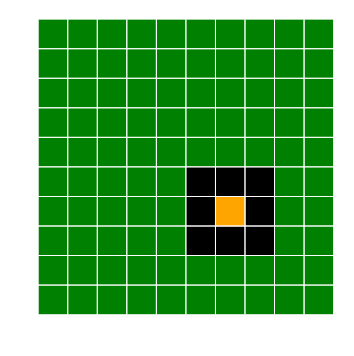
The rules of the Game of Life can be summarized as follows:
- Any live cell with two or three live neighbors survives.
- Any dead cell with with three live neighbors becomes a live cell.
- All other live cells die in the next generation, and all other dead cells stay dead.
Counting the number of live neighbors
In order to update our array from one state to the next, we need to be able to count the number of live neighbors of the $(i,j)$th cell for any choice of $i,j$.
Exercise: Write a function count_live_neighbors(cells,i,j) that counts the number of living neighbors of the $(i,j)$th cell.
- We handled a similar problem with the Image Denoising project.
- How can we handle cells on the edge of the grid?
- The
np.sumfunction will add all values in an array. - We want to exclude (or remove from the sum) the $(i,j)$th cell when counting the number of living neighbors.
def get_padded_cells(cells, pad=1):
    num_rows, num_cols = cells.shape
    padded_cells = np.zeros((num_rows + 2*pad, num_cols + 2*pad), dtype=int)
    padded_cells[pad:-pad, pad:-pad] = cells
    return padded_cells
def count_live_neighbors(cells, i, j):
    padded_cells = get_padded_cells(cells)
    neighbors = padded_cells[i:i+3, j:j+3]
    live_neighbors = np.sum(neighbors) - neighbors[1,1]
    return live_neighbors
print(count_live_neighbors(cells, 4,5))
print(count_live_neighbors(cells, 5,5))
print(count_live_neighbors(cells, 6,5))

print(count_live_neighbors(cells, 5,4))
1
2
1
3
Updating the cells population
We can now update the cells array according to the rules. We have to update every entry of the array, so we will need to loop through all the entries.
Exercise: Write a function update_cells(cells) that takes in a population array cells, applies the Rules of Life to update the population, and returns the updated population.
def update_cells(cells):
    num_rows, num_cols = cells.shape
    updated_cells = cells.copy()
    for row in range(num_rows):
        for col in range(num_cols):
            live_neighbors = count_live_neighbors(cells, row, col)
            # If a live cell has exactly two or three living neighbors, it stays alive
            if cells[row, col] == 1 and (live_neighbors == 2 or live_neighbors == 3):
                updated_cells[row, col] = 1
            # If a dead cell has exactly three living neighbors, it becomes alive
            elif cells[row, col] == 0 and live_neighbors == 3:
                updated_cells[row, col] = 1
            # All other cells are dead
            else:
                updated_cells[row, col] = 0

    return updated_cells
updated_cells = update_cells(cells)

fig = plt.figure(figsize=(10,5))
plt.subplot(1,2,1)
plt.imshow(cells)
plt.title('Original cells')

plt.subplot(1,2,2)
plt.imshow(updated_cells)
plt.title('Updated cells')
Text(0.5, 1.0, 'Updated cells')
